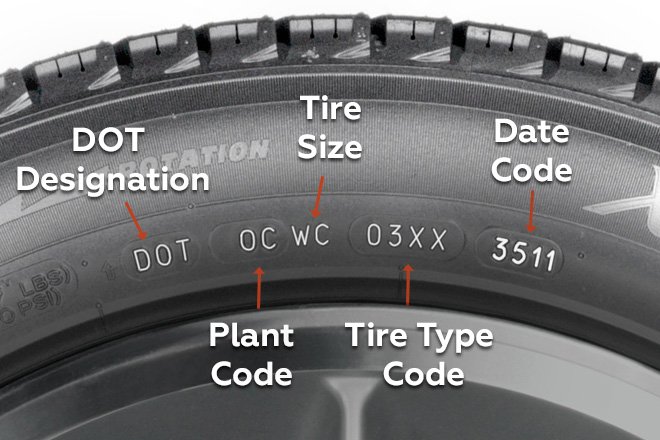
Tires age even when the tread looks perfect, and old rubber can crack and fail. Our Tire Age Calculator reads the 4-digit DOT date code on your tire sidewall and tells you the manufacture week, the exact age in years and months, and whether it’s time to replace. It’s handy when buying used tires or a used car.
Tire Age Calculator
Find the DOT code on the tire sidewall. The last four digits are the week and year of manufacture: 2319 means week 23 of 2019.
How to use:
Find the DOT code on your tire sidewall.
Enter the full code or just the last 4 digits, such as 2319.
Choose the date you want to check the age on (today by default).
Click “Check Tire Age” to see the age and replacement advice.
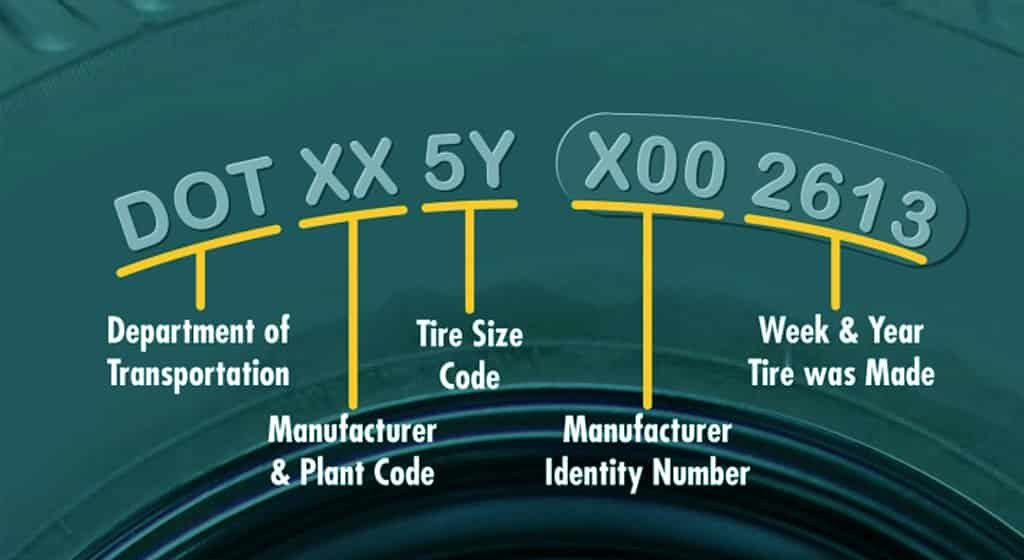
Example DOT code: DOT 8CKJ 1BX 2319
- DOT 8CKJ 1BX is the plant and tire size code. You can ignore it for age.
- 2319 is the date code. It sits at the very end and is usually inside a small oval or rounded box.
- 23 is the week of manufacture, so week 23, which is early June.
- 19 is the year, so 2019.
FAQs:
Q: How do I read a DOT date code?
A: The last four digits are the week and year. For example, 2319 means week 23 of 2019.
Q: When should tires be replaced?
A: Many manufacturers advise replacement at around 6 years, and no tire should be used past 10 years.
Q: What if my code has only 3 digits?
A: That tire was made before 2000 and should be replaced.